
CLASS OBJECTIVE
Learn what a spreadsheet is and identify its basic elements (cells, rows, columns, data types, toolbar, and formulas) in order to understand how spreadsheets can organize and analyze information easily.

CLASS AGENDA
Introduction:
“Have you ever used a table to organize your expenses, grades, or schedules? Imagine if that table could calculate for you!”
Short Review:
Discuss how forms or surveys collect data that can be analyzed with spreadsheets.
Explanation:
What is a spreadsheet (Google Sheets / Excel)?
Main elements:
Cell, Row, Column
Active cell and cell address
Formula bar and toolbar
Sheet tabs and menus
Types of data: text, number, date, formula.
Basic uses: organization, calculation, data presentation.
Demonstration:
Open a new spreadsheet and identify each element.
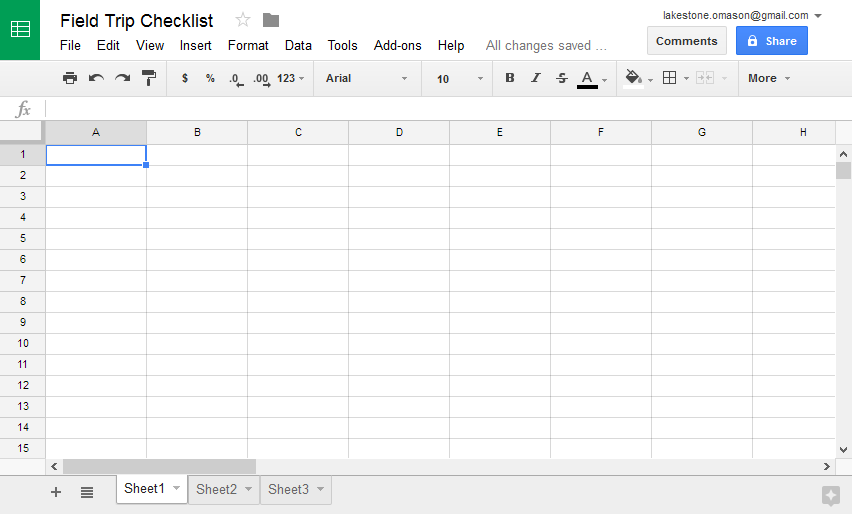
Activity – “My First Spreadsheet” (posted in Classroom):
Create an screenshot and edit it mentioning each element of the spreadsheet.
Homework –
Complete your spreadsheet at home and upload it to Classroom.
Take notes in your notebook.
🧮 NOTES IN YOUR NOTEBOOK
Answer these questions:
What is a spreadsheet used for?
What are rows and columns?
What is the difference between data and formulas?
Why are spreadsheets important for students or offices?
📌 KEYWORDS
Spreadsheet: A digital table used to organize and calculate information.
Cell: The intersection of a row and column.
Row: A horizontal line of cells.
Column: A vertical line of cells.
Formula: A rule or operation used to calculate values.
Data: Information entered in the spreadsheet.
Toolbar: The area with icons and commands to edit the sheet.
Sheet tab: The name and section of each spreadsheet inside a file.
AutoSum: A tool that automatically adds selected numbers.
🖋 HOMEWORK
Will be published in Classroom.