
CLASS OBJECTIVE
Learn how to use the COUNTIF() function to count cells that meet a specific condition and apply it to analyze simple data in spreadsheets.
🗓 CLASS AGENDA
💬 Introduction
“Imagine you have a list of grades and you want to know how many students passed.
Instead of counting one by one, the spreadsheet can count only the ones you choose.”
1️⃣ Short Review
Students recall:
What a function is
What a range is (A1:A10)
What counting functions do (COUNT, COUNTA, COUNTBLANK)
2️⃣ Explanation: What is COUNTIF()?
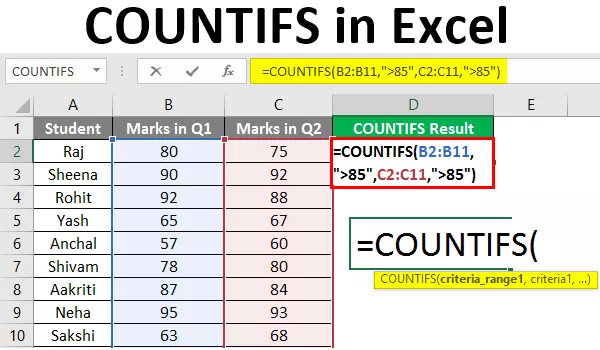
COUNTIF() counts cells that meet a specific condition.
📌 Structure:
=COUNTIF(range, criteria)Range → Where we look
Criteria → What we are looking for
💡 Simple definition:
“COUNTIF counts how many cells match a rule.”
3️⃣ Examples
🔹 Count how many students passed:
=COUNTIF(A1:A10, "Passed")🔹 Count how many grades are greater than 70:
=COUNTIF(A1:A10, ">70")🔹 Count how many times the word “Yes” appears:
=COUNTIF(B1:B20, "Yes")Something to keep in mind :
Text criteria must go inside quotation marks
Numbers with symbols also use quotes (”>70”)
4️⃣ Demonstration:
Pay a lot of attention while your teacher shows you step by step:
Writing the formula
Selecting a range
Using text criteria
Using number conditions (> < =)
Changing values and watching results update
Please observe how the result changes automatically.
5️⃣ Activity – “Count With a Rule”
Students will use COUNTIF() in a small table (grades, attendance, preferences) to answer simple questions.
6️⃣
Homework
Students will complete a short spreadsheet using COUNTIF() with at least three different criteria.
7️⃣ Take notes in your notebook.

📓 NOTES IN YOUR NOTEBOOK
Answer these questions:
What does COUNTIF() do?
What are the two main parts of COUNTIF()?
Why do we use quotation marks in some criteria?
Write one example of COUNTIF() using numbers.
How can COUNTIF() help you as a student?
⸻
📌 KEYWORDS
Function: A built-in calculation tool
Range: A group of cells (A1:A10)
Criteria: A condition used in a function
COUNT(): Counts numbers
COUNTA(): Counts non-empty cells
COUNTBLANK(): Counts empty cells
COUNTIF(): Counts cells that meet a condition
Quotation marks (” “): Used for text or comparison criteria