septiembre 26, 2025

Week 5: Google Forms: Types of question in a form.


Class Objective


Design and insert different types of questions in Google Forms in order to distinguish between open and closed questions and practice creating effective questions for real-life contexts.

Formularios de Google | 👨🏻‍💻 Raúl Diego 🚀

Class agenda:

  1. Introduction: “Have you ever answered an online quiz or survey? Did you enjoy it or was it boring?” 
    1. Short review: What is Google Forms? 
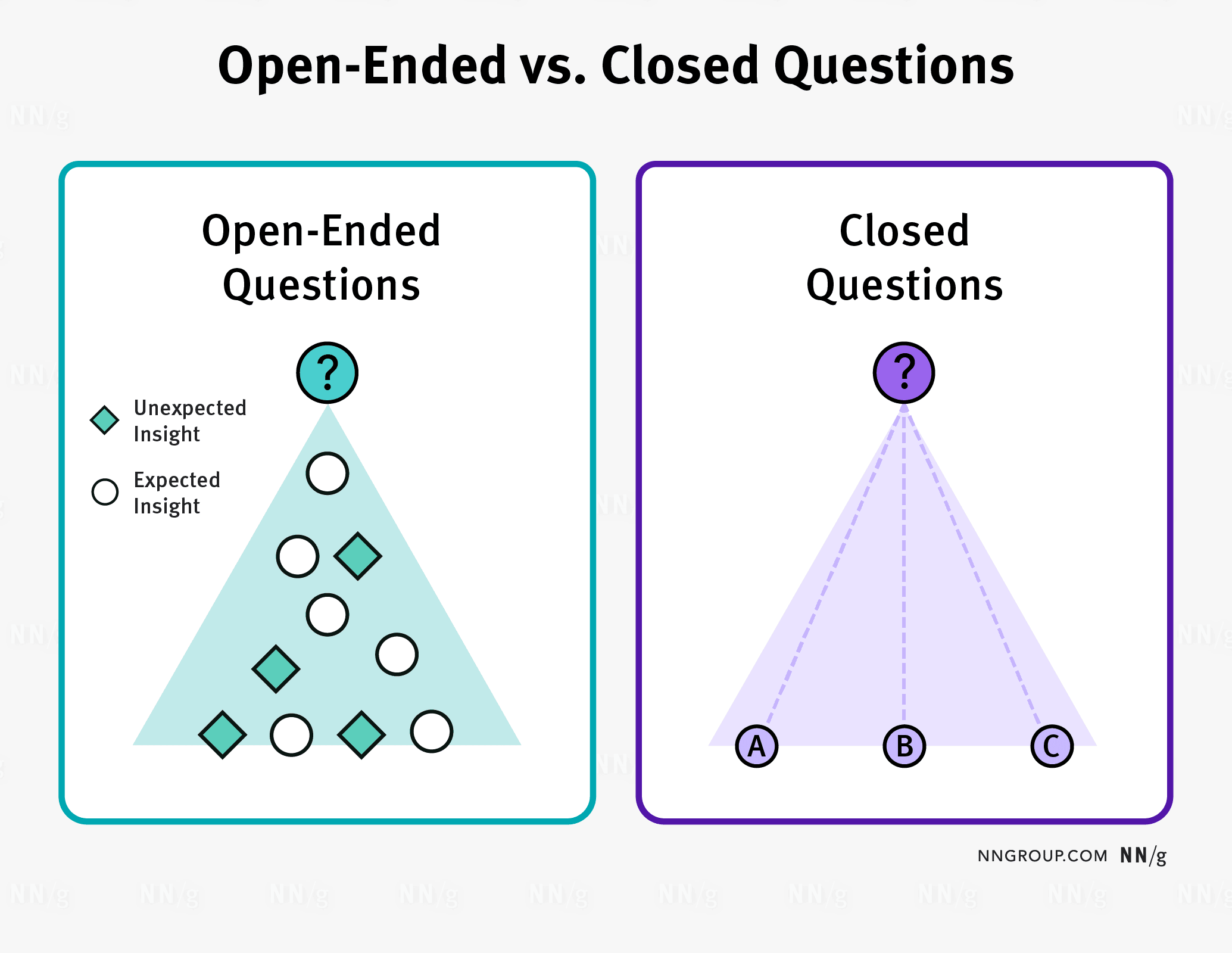
  2. Explanation: Open-ended vs. Closed-ended Questions.
    1. Tips for writing good questions (clear, specific, avoid confusion).
    2. Demonstration: How to insert question types in Google Forms (short answer, paragraph, multiple choice, checkboxes, dropdown).
  3. Activity – “My First Mini-Survey” (posted in Classroom).
  4. Homework –  Make sure to write it in your agenda.
  5. Take notes in your notebook
Open-Ended vs. Closed Questions in User Research - NN/G

📓 Notes in your notebook

Answer these questions in your notebook
    1. What's the difference between open-ended and closed-ended questions?
    2. If you were creating a survey for your friends, what topic would be the most interesting for them? Write 3 examples of questions you would ask.
    3. Mention the characteristics of a well-asked question.

📌 Keywords:

  1. Open-ended question - This question lets you answer in your own words.
  2. Closed-ended question - This question has a specific answer to pick from.
  3. Multiple choice - This question must be answered with just one option from the list.
  4. Checkbox - This question can be answered with more than one option from the list.
  5. Dropdown - List of possible answers to choose from. You can select only one.
  6. Survey - A form that asks for opinion.

🖋 Homework:

Will be published in Classroom.


septiembre 22, 2025

Week 4 - Google Workspace Tools

Class objective:

Recognize the function of different Google applications using small examples to use them properly.


Class agenda:

  1. Introduction: What is Google? Is Google only a search engine? What else does it have?
  2. Explanation of Google Docs – main functions (formatting, text styles, bullet points).
    • Activity in Google Docs: Write a short text – “3 reasons why I need to use docs or any text processor in my everyday life.”
  3. Explanation of Google Slides – layouts, inserting images, transitions.
    • Activity in Google Slides: Create 1 slide, and write a short text with an image – “3 reasons why I need to use Google Slides or any program to create electronic presentations in my everyday life.”
  4. What other Google services do you remember?
  5. Explanation of Google Forms – Introduction
  6. Activity: Will be posted in the classroom.
  7. Take notes in your notebook.

420 Self-Reflection Questions to Unlock a New You


📓 Notes in your notebook

Answer the following questions in your notebook (notes):

  1. Which Google tool did you like the most? Why?
  2. How can these tools help you in your schoolwork?
  3. Which tool do you think you will use the most in the future?
  4. What is a form, and what is it used for?


📌 Keywords:

  1. Form: A set of questions.
  2. Survey: A form that asks for opinions.
  3. Quiz: A form that tests what you know.
  4. Response: An answer to a question.
  5. Google Docs: Google application used as a word processor
  6. Google Slides: Google application used to create electronic presentations
  7. Formatting: Modify its visual appearance and organization to make it more legible, and easy to understand.

septiembre 14, 2025

Week 3: Google Drive File Organization Review

Class Objective:

Review the Google Drive organization system in order to create a folder for projects and maintain a well-organized digital workspace.

Google Workspace: Boosting Collaborative Efficiency - nForce IT

Class agenda:

  1. Log in to the school ERP platform from a computer.
  2. Log in to the school ERP platform from a mobile phone – steps to do it.
    1. Review absences.
    2. Review grades.
  3. Google Drive – explanation of its use and purpose.
  4. Activity – will be posted in the classroom.
  5. In your notebook, answer the following questions with the information given during the class:
    1. Why is it important to keep your files organized?
    2. What are the advantages of saving files in Drive? (Mention at least 3)
    3. How are you going to apply what we learned today in your school and everyday life?