
CLASS OBJECTIVE
Understand how the IF() function works in spreadsheets and use it to evaluate conditions and generate automatic results based on TRUE or FALSE outcomes.
This allows spreadsheets to make decisions automatically.
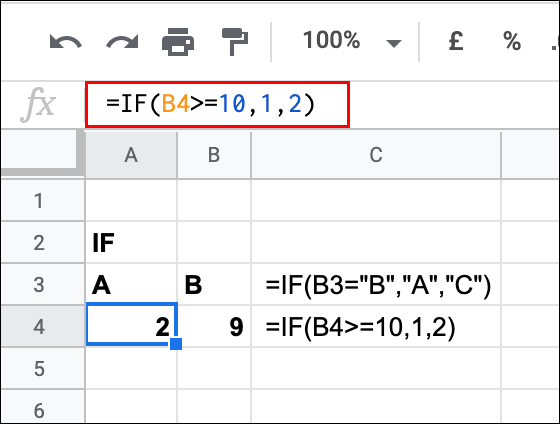
CLASS AGENDA
Introduction
How spreadsheets can make decisions.
Short Review
Comparison operators and conditions.
Explanation
Structure and logic of the IF() function.
Demonstration
Using IF() in real examples.
Practice Activity
Students apply IF() to simple data.
Homework
Practice decision-making formulas.
1. Introduction
Imagine a spreadsheet that can automatically decide:
- If a student passed or failed
- If a product is expensive or cheap
- If attendance is correct or missing
Instead of checking manually, we can use a function that makes decisions for us.
That function is IF().
2. Short Review
Before learning IF(), remember:
Comparison Operators
Operator | Meaning |
|---|---|
> | Greater than |
< | Less than |
>= | Greater than or equal to |
<= | Less than or equal to |
= | Equal to |
These operators help us create conditions.
3. What is a Logical Function?
A logical function evaluates a condition and returns a result.
The IF() function works like a simple decision:
👉 If something is true → do one thing
👉 If something is false → do another thing
4. Structure of IF()
The IF() function has three parts:
=IF(condition, value_if_true, value_if_false)Explanation
- Condition → what we evaluate
- Value_if_true → result if the condition is TRUE
- Value_if_false → result if the condition is FALSE
5. Examples
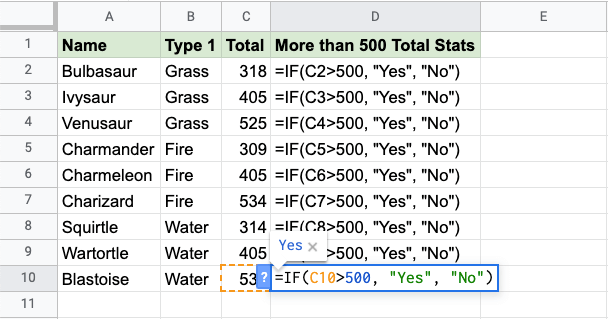
Example 1 – Pass or Fail
=IF(A1>=70,"Passed","Failed")If the value in A1 is 70 or more → Passed
If not → Failed
Example 2 – Attendance
=IF(B1="Present","✔","✘")If the student is present → ✔
If not → ✘
Example 3 – Budget Check
=IF(C1>100,"Over budget","OK")If the value is greater than 100 → Over budget
If not → OK
6. How IF() Works
When you use IF(), the spreadsheet:
- Evaluates the condition
- Decides if it is TRUE or FALSE
- Returns the corresponding result
If the value changes, the result updates automatically.
7. Demonstration (Google Sheets)
Students observe how the teacher:
- Writes an IF() formula
- Uses comparison operators
- Applies the formula to a dataset
- Copies the formula to other cells
Students notice how results change when values are modified.
8. Practice Activity
Students will work with a small dataset (grades, attendance, or tasks).
They must:
- Create at least two IF() formulas
- Use comparison operators
- Generate automatic results such as:
- Passed / Failed
- Yes / No
- Complete / Incomplete
9. Notes in Your Notebook
Answer the following questions:
- What is the IF() function?
- What is a condition?
- What happens when a condition is TRUE?
- What happens when a condition is FALSE?
- Write your own example of an IF() formula.
KEYWORDS
IF()
A logical function that evaluates a condition and returns different results.
Logical Function
A function that makes decisions based on conditions.
Condition
A logical test that can be TRUE or FALSE.
TRUE / FALSE
Possible results of a condition.
Comparison Operator
Symbols used to compare values.
Decision Rule
A rule that determines what result to display.